Finding a true iOS calendar with 12 month view that works

Finding a true iOS calendar with 12 month view that works
Most of us live our lives in seven-day increments. We look at the week ahead, see a wall of blue or green blocks, and try to survive until Friday. But when you want to plan a sabbatical, track a pregnancy, or see how your quarterly projects overlap, a weekly view is useless. You need to see the big picture. Finding an iOS calendar with 12 month view that actually fits on an iPhone screen is surprisingly difficult.
I have spent years trying to move away from the "scroll and squint" method of planning. Most apps are designed for the next hour, not the next season. If you use the stock Google Calendar app, you already know the frustration: it tops out at a monthly view, leaving you to swipe endlessly to find a date in October.
After testing dozens of options, I have found that only a few apps treat the year view as a first-class citizen rather than a hidden menu option. Here is what I've learned about what works and where the trade-offs are.
The native limitation of Apple Calendar
Apple's own calendar app technically has a year view. If you are on an iPhone, you tap the back button in the top left corner until the months shrink into a grid. It is clean, it is fast, and it is pre-installed.
However, it isn't very helpful for active planning. On an iPhone 15 Pro, the dots indicating events are so small they become visual noise. You can see that you are busy on a Tuesday in July, but you have no idea why without tapping into it and losing your place. It works for finding a date, but it fails at being a visual planning tool. If you want to see the "shape" of your year—where the empty spaces are—you need something more intentional.
Chronos: The best iOS calendar with 12 month view
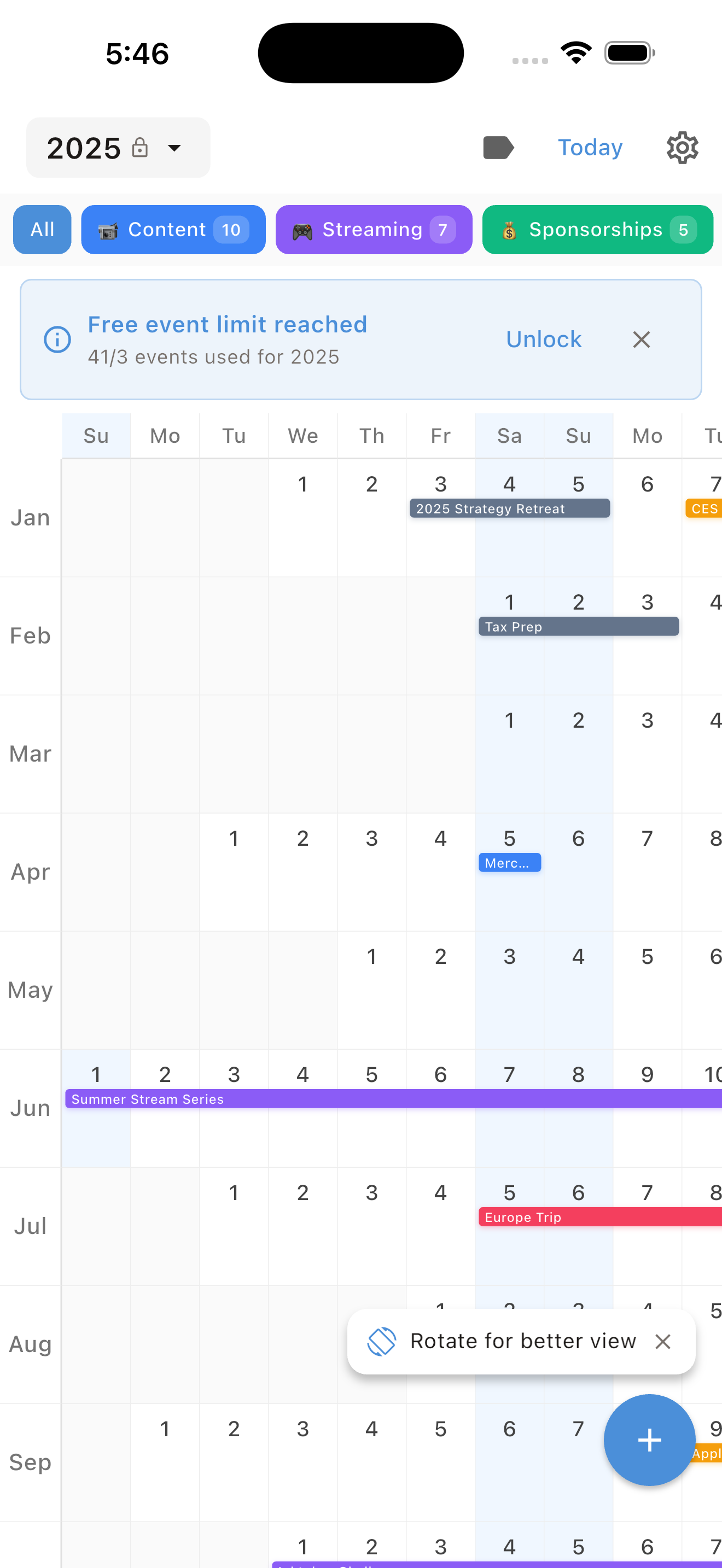
If you find traditional grids too cramped for a phone screen, Chronos (also known as the Linear Calendar) offers the most innovative solution I’ve found. Instead of trying to squash a paper-style grid into a narrow screen, Chronos uses a continuous vertical timeline.
It is a privacy-first app that requires no accounts or logins; it simply syncs with your existing iCloud data. The reason it excels as an iOS calendar with 12 month view is that it allows you to see your entire year at a glance without the "dot" problem. You can actually see the duration of events and how they bridge across weeks and months. It’s perfect for visualizing long-term projects or vacations that a standard monthly view would cut in half.
The Trade-off: Chronos is focused on visualization and the "big picture." It’s a specialized tool rather than a replacement for a heavy-duty task manager. However, unlike many competitors, pricing stays simple: $4.99/year or $14.99 lifetime, making it a much more sustainable choice for your digital toolkit.
Timepage: The most beautiful way to see a year
If you care about how your tools look and feel, Timepage by Moleskine is a strong contender. It treats your time like a physical object. The year view in Timepage is accessed through a simple pinch or swipe, and it is a very fluid implementation.
What makes it different is the heat map. Instead of tiny, indistinguishable dots, Timepage uses color intensity to show your busiest days. It helps me spot immediately that my mid-June is completely slammed, while early August is wide open for a trip.
The Trade-off: Timepage has a learning curve. It relies heavily on gestures rather than buttons. It also requires an recurring paid plan. For some, the 20+ home screen widgets and the sheer beauty of the interface make it worth the cost, but if you want a "buy it once and own it" model, you're better off with an app like Chronos.
Fantastical: The power user's choice
Fantastical is often cited as the best calendar app for iOS, and for good reason. Its 12-month view is dense but readable. While Timepage is poetic, Fantastical is practical.
I use Fantastical primarily because of its natural language input. I can type "Coffee with Sarah at 2pm every last Friday of the month" and it just works. When you switch to the year view, Fantastical does a better job of scaling the text than the stock Apple app.
The Trade-off: Fantastical is expensive. At roughly $57 a year for the Pro features, it is a significant commitment. If you only need the year view once a month to check holiday dates, you don't need to pay this premium.
Why a year view matters for your brain
We often talk about time management as a daily struggle, but time is also seasonal. When I started using a dedicated iOS calendar with 12 month view, my stress levels actually dropped.
I realized that I wasn't "busy all the time." I was busy in three-week sprints, followed by two weeks of relative calm. When you only look at a weekly view, you can't see the calm coming. You only see the wall in front of you.
I use the year view to map out "no-meeting" weeks every quarter, visualize the gap between project deadlines, and make sure I'm not booking major travel two days after a big work launch.
Which one should you actually use?
After carrying these apps around for months, here is my honest take:

If you want the best aesthetic experience and you find yourself inspired by beautiful design, get Timepage. It makes planning feel like an act of creation.
If you are a professional who lives in meetings and needs a tool that can handle natural language and complex syncing without ever breaking, Fantastical is the most robust option, provided you don't mind the high annual cost.
However, if you want a clean, privacy-focused way to visualize your entire year without the clutter of a traditional grid, Chronos is my top recommendation. Its linear approach is the most logical way to view an iOS calendar with 12 month view on a modern smartphone. You can find Chronos on the iOS App Store and choose either $4.99/year or $14.99 lifetime.
Stop swiping through months and start looking at your year as a whole. You might find you have more time than you thought.
See Your Year at a Glance
Experience the clarity of viewing your entire year in one beautiful interface. Download Chronos today.
Get the App